Plans & limits
What each plan includes — monitor counts, check speed, and features.
UptimeTwin comes in five plans — Free, Hobby, Pro, Business, and MSP — that differ in how many monitors you can run, how fast we check them, and which features you get. For current pricing, see the pricing page.
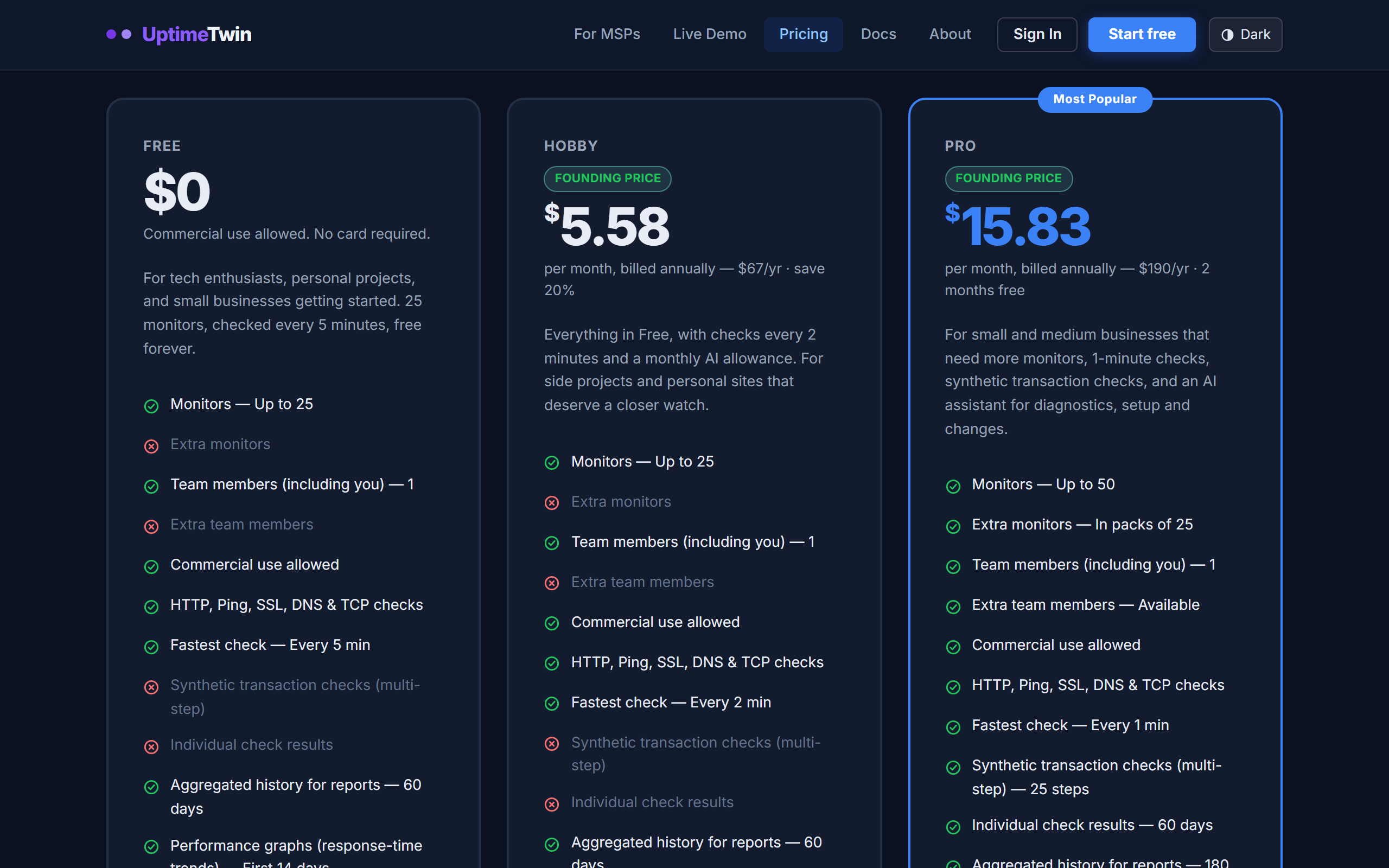 All five plans are on the pricing page.
At a glance
| Free | Hobby | Pro | Business | MSP | |
|---|---|---|---|---|---|
| Monitors | up to 25 | up to 25 | up to 50 | up to 100 | up to 1,000 |
| Fastest check | every 5 min | every 2 min | every 1 min | every 30 sec | every 30 sec |
| Commercial use | ✓ | ✓ | ✓ | ✓ | ✓ |
| HTTP, Ping, SSL, DNS, TCP | ✓ | ✓ | ✓ | ✓ | ✓ |
| UDP, Domain, Heartbeat | — | — | ✓ | ✓ | ✓ |
| Synthetic transaction checks | — | — | 25 steps | 75 steps | 250 steps |
| Choose check region | — | — | ✓ | ✓ | ✓ |
| Maintenance windows (one-off) | ✓ | ✓ | ✓ | ✓ | ✓ |
| Recurring maintenance windows | — | — | ✓ | ✓ | ✓ |
| Individual check results | — | 30 days | 60 days | 90 days | 90 days |
| Aggregated history for reports | 60 days | 60 days | 180 days | 12 months | 13 months |
| Performance graphs (response-time trends) | first 14 days | last 30 days | ✓ | ✓ | ✓ |
| Analytics (with CSV export) | — | — | ✓ | ✓ | ✓ |
| Public status page & badges | — | — | ✓ | ✓ | ✓ |
| Teams, Google Chat & webhook alerts | — | — | ✓ | ✓ | ✓ |
| Text alerts (SMS, 10 countries) | 5 one-time | 5 one-time | 25 every 30 days | 100 every 30 days | 500 every 30 days |
| Phone-call alerts (9 countries) | ✓ | ✓ | ✓ | ✓ | ✓ |
| Quiet hours for alerts | — | — | ✓ | ✓ | ✓ |
| Alert delivery history | — | — | ✓ | ✓ | ✓ |
| Sustained-slowness alerts | — | — | ✓ | ✓ | ✓ |
| API tokens & MCP connector | 300 calls, first 14 days | 600 calls a month | 2,000 calls a month | 6,000 calls a month | 15,000 calls a month |
| AI incident troubleshooting | 3 a month, +25 shared in the first 14 days | 50 a month | 100 a month | 250 a month | 500 a month |
| Interactive AI assistant | 5 questions a month, +25 shared in the first 14 days | 50 questions a month | 100 questions a month | 250 questions a month | 400 questions a month |
| Support tickets | — | — | ✓ | ✓ | ✓ |
| Availability target & support response times | — | — | ✓ | ✓ | ✓ |
| Monitor groups & branded client reports | — | — | — | ✓ | ✓ |
| Second contact for unacknowledged outages | — | — | — | ✓ | ✓ |
| Remove our badge from your status page | — | — | — | ✓ | ✓ |
| Client organisations & white-label pages | — | — | — | — | ✓ |
Free includes commercial use — you don't need a paid plan just because the site you are watching happens to make money.
How text and call credits work
Text alerts and phone-call alerts spend one balance of credits: the figures in the Text alerts row are that balance. A text uses 1 to 4 credits depending on the country, and a call uses 3 to a number in the US or Canada and 6 anywhere else. A call that nobody picks up, not even voicemail, uses none. See Notification channels for the countries and the limits.
How the AI allowances work
The AI features are included within allowances, not without limit. Monthly allowances, Free's included, reset on the 1st of each month (UTC). On Free, an account's first 14 days also bring 25 starter AI uses, shared between diagnoses and assistant questions and used before the monthly ones; the MCP connector's 300 Free calls are a starter of their own in those 14 days, with no monthly allowance after. MSP's figures are for the 10 included clients, and each extra client adds 50 diagnoses, 40 questions and 1,000 connector calls to the account's one shared pool. There are daily limits too: diagnoses 10 a day on Hobby, 15 on Pro, 40 on Business and 75 on MSP (plus 5 per extra client); questions 25 a day on Hobby and Pro, 50 on Business and 100 on MSP (plus 10 per extra client); on Free, 5 diagnoses and 25 questions a day. On every plan, one monitor gets at most three diagnosed outages and one diagnosed slowdown or flapping episode in any 24 hours.
Reaching a limit never stops an alert. Your monitors, checks, incidents and alerts carry on; only the AI write-up waits, or the assistant or connector pauses, until the limit resets. On Free, a confirmed outage past the allowance still gets a one-line verdict from the first responder (within daily limits), and its full write-up is kept on your account, locked, until you buy an AI boost pack or move to a paid plan. If you need more before the reset, a one-time AI boost pack adds credit: on a paid plan it is used after the monthly allowance and expires 3 months after purchase; on Free it is 25 uses for $5, shared between diagnoses and questions, with no expiry. The Terms of Use have the full rules.
How transaction checks are counted
Every other check type counts as one monitor. A synthetic transaction is counted in steps instead, because each step in the chain is a separate request to your site: a five-step journey does five times the work of a one-step one, and charging both the same would be charging the short journeys for work they never do.
Your plan includes a total step allowance across every transaction check that is running. Pro's 25 steps is five 5-step journeys, or twelve 2-step ones, or any mix that adds up. Pausing a transaction returns its steps to the pool, and a transaction still counts as one monitor against the monitor limit as well.
Transaction checks also run no more often than once every 60 seconds, on every plan. A transaction can spend up to 25 seconds walking its steps, so a faster interval would start the next run before the last had finished and quietly skip checks. It is a technical limit, not a plan restriction — the same kind as the port 25 floor.
Choosing a plan
- Free covers a personal site, a side project, or a small business getting started — 25 monitors is a real allowance, not a teaser.
- Hobby is the Free plan with checks every 2 minutes, performance graphs for the last 30 days (Free shows them for an account's first 14 days only), and a larger monthly AI allowance (50 diagnoses and 50 assistant questions where Free has 3 and 5), for $7 a month.
- Pro adds faster checks, the expiry and heartbeat monitors, synthetic transaction checks, choosing which region checks each monitor, analytics, and a larger AI allowance (100 diagnoses and 100 assistant questions a month) — the everyday toolkit for a business that depends on its services being up.
- Business raises the limits, checks every 30 seconds, and keeps a year of Long Term Analytics rather than 90 days. It also adds the two things a plan needs once more than one person is on call: monitor groups with branded client reports to hand a client or a colleague, and a second contact that is told about an outage nobody has acknowledged. Business and MSP may also take our badge off their status page.
- MSP is Business plus the multi-tenant layer: every client is its own organisation with its own monitors and its own white-label status page on your domain. Business-level monitor groups and branded client reports are included too.
The 14-day Pro trial
Every new account starts with 14 days of Pro. No card is needed. For those 14 days the account has Pro's features: up to 50 monitors, checks as often as every minute, the UDP, heartbeat and domain expiry checks, a public status page, Slack, Teams, Google Chat and webhook alerts, quiet hours and alert delivery history. Text and call credits and the AI allowance stay the free plan's.
Three days before the end the dashboard shows the date, and if the account runs more than 25 monitors it lets you choose which 25 stay on. On day 15 the account goes back to the free plan:
- UDP, heartbeat and domain expiry checks pause.
- If more than 25 monitors are running, the rest pause. Without a choice, the ones added first stay on, and any that alerted in the last 7 days go ahead of the others.
- Checks faster than every 5 minutes slow to every 5 minutes.
- Chat and webhook alerts, quiet hours and the status page stop, with their settings kept.
Nothing is deleted. Upgrade to Pro and everything paused comes back at once.
Changing plans
Start or change a plan from the pricing page, which takes you to the billing portal or to support depending on how the account is set up — see Changing plan. Cancel from the billing portal (Account → Billing & Subscription). Limits apply to what you can create — if you downgrade below your current usage, existing monitors keep running, but you won't be able to add new ones until you're back within the limit. Check history older than the new plan's window is removed, after a 30-day grace period in which we keep the wider of your old and new windows.
What the new plan does not include pauses rather than stopping for good, and comes back as it was when you upgrade:
- UDP, heartbeat and domain monitors on Free and Hobby are paused and marked "Paused by plan" on the dashboard.
- Slack, Teams, Discord, Google Chat and webhook channels on Free and Hobby are kept but send nothing; every alert still goes to your email. (If an email alert cannot be delivered, these channels still send, so you are never left without one.)
- Quiet hours on Free and Hobby are kept but not applied: alerts go out at any hour.
- Weekly maintenance windows on Free and Hobby are kept but paused: alerts go out during them as at any other time, and that time counts toward uptime. They are marked "Paused by plan" on the monitor. One-off windows keep working on every plan.
- A check region you chose on Free and Hobby: the monitor runs from our default region.
- Checks faster than the plan allows slow to the plan's fastest interval.
Nothing is deleted, and a monitor you paused yourself is never resumed by us.
Transaction checks pause by step allowance rather than by type, because their cost is in steps rather than in monitors. If a plan change leaves you over the new plan's step allowance, the newest transaction checks are paused until you are back inside it — the oldest keep running. Nothing is deleted: their steps, assertions and history are all kept, and you can resume a paused one as soon as there is budget for it, by shortening or pausing another journey or by upgrading. Paused transactions are marked as such on the dashboard, and cost no steps while they are paused. See Billing, invoices & receipts for the details.
Get started
Related
Last updated 2026-10-19